The outage that started with an old network diagram
· 3 min read
A composite story of a small-office outage: a static IP inside the DHCP pool, a diagram that was two years behind, and the four hours it cost. What would have caught it.
This story is a composite. The pattern is one we see again and again in small networks; the company, people and details are invented.
At 8:40 on a Monday, the accounts team at a forty-person engineering firm could not open the finance system. Everyone else could work. By 9:15 the managing director was asking whether payroll would run on Thursday.
The first hour
The office manager, who looks after IT alongside everything else, restarted the finance server. It came back, worked for six minutes, and dropped off again. She called the IT company that set the network up.
The engineer who answered had never been to the site. He asked for the network diagram. There was one: a PDF from the installation two years earlier, showing a firewall, a switch, the server and "workstations". It had the server's address, 192.168.1.20. He asked her to ping it. It replied. Then it did not. Then it did.
The second hour
An address that answers and stops answering on a cycle is usually two devices fighting over it. The engineer asked what had changed recently. Nothing, said the office manager. Then she remembered: the new large-format plotter had been installed on Friday by the supplier.
The supplier had given the plotter a static address so the designers' drawing software could find it. They had picked 192.168.1.20 because it was free when they pinged it on Friday afternoon, with the finance server shut down for its weekend backup.
The fix, and the real cost
Moving the plotter to a different address took five minutes, once someone was in the building. The engineer arrived at 11:30. Finance was back by 11:45. The accounts team lost a morning, and payroll ran on Thursday.
The supplier had not done anything unusual. They had no way of knowing which addresses were reserved. The diagram showed the server's address but not the DHCP pool, the other statics, or the printer VLAN the installer had meant to set up and never did.
What would have caught it
None of these is sophisticated:
- An IP plan with the statics and the DHCP pool written down. The supplier would have asked for an address, and someone would have looked.
- A rule that the documentation is updated as part of the change. The plotter install is not finished until the plotter is in the inventory.
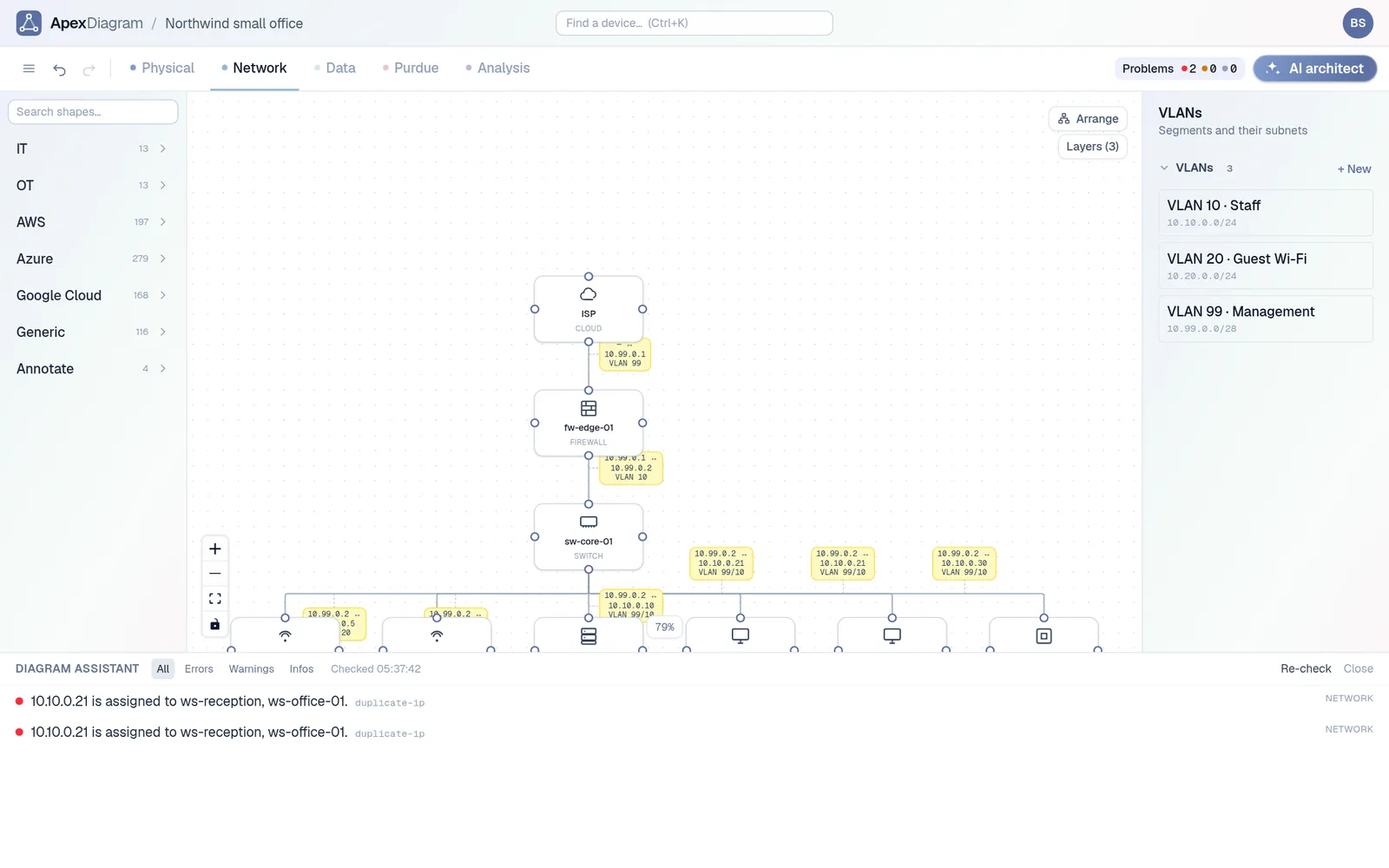
- Checks on the record itself. A diagram that knows each subnet's pool and every static address can warn about a duplicate the moment it is entered, and about a static address sitting inside the DHCP range before it ever causes a conflict.
- A diagram the supplier could see. A read-only link, sent before the visit, answers "what address can I use?" without a phone call.
The general lesson
The outage was not caused by a bad diagram. It was caused by a decision made without information, and the diagram was where that information should have been. Out-of-date documentation is not neutral; it is confidently wrong, which is worse than missing.
ApexDiagram's diagram assistant checks for exactly this class of problem: duplicate addresses, an address outside its subnet, a static address inside a DHCP pool, a subnet with no gateway. Our post Your network diagram is already wrong lists the rest.
The diagram assistant catching a duplicate IP
If your diagram is a PDF from the installer, import what you have and see what it finds. See plans and pricing.
Document your network once, keep it current
One network graph, four synchronized views, a linter and a bill of materials. Import the Visio or draw.io file you already have.
Join the beta