VLSM subnetting, step by step, with a worked example
· 3 min read
How to split one address block into right-sized subnets with VLSM: the method, a full worked example on 192.168.10.0/24, and the mistakes that cost marks.
Variable Length Subnet Masking (VLSM) means giving each subnet a mask that fits how many hosts it needs, instead of cutting one block into equal pieces. It is on every networking course because it is how real address plans are built: a staff LAN with a hundred hosts and a point-to-point router link with two should not get the same /24.
The method
- List the subnets and their host counts. Include the gateway in the count if it needs an address on that subnet.
- Sort them largest first. This is the step people skip, and it is why their subnets overlap or leave gaps.
- For each one, find the smallest block that fits. A block of 2^n addresses has 2^n − 2 usable hosts, because the first address is the network and the last is the broadcast.
- Allocate from the start of the free space. Each block must start on a multiple of its own size. Allocating largest first makes that automatic.
- Write down what is left over. It is your room to grow.
The block sizes you need to know:
| Prefix | Addresses | Usable hosts |
|---|---|---|
| /24 | 256 | 254 |
| /25 | 128 | 126 |
| /26 | 64 | 62 |
| /27 | 32 | 30 |
| /28 | 16 | 14 |
| /29 | 8 | 6 |
| /30 | 4 | 2 |
Worked example
You have 192.168.10.0/24 and need:
- Staff: 100 hosts
- Guest Wi-Fi: 50 hosts
- Servers: 20 hosts
- Printers: 10 hosts
- Management: 5 hosts
- A router-to-router link: 2 hosts
They are already sorted largest first. Now take each in turn.
Staff, 100 hosts. A /26 gives 62, too few. A /25 gives 126. Allocate 192.168.10.0/25: network .0, usable .1 to .126, broadcast .127.
Guest Wi-Fi, 50 hosts. A /26 gives 62. The next free address is .128, which is a multiple of 64. Allocate 192.168.10.128/26: usable .129 to .190, broadcast .191.
Servers, 20 hosts. A /27 gives 30. Next free is .192. Allocate 192.168.10.192/27: usable .193 to .222, broadcast .223.
Printers, 10 hosts. A /28 gives 14. Allocate 192.168.10.224/28: usable .225 to .238, broadcast .239.
Management, 5 hosts. A /29 gives 6. Allocate 192.168.10.240/29: usable .241 to .246, broadcast .247.
Router link, 2 hosts. A /30 gives exactly 2. Allocate 192.168.10.248/30: usable .249 and .250, broadcast .251.
What is left is 192.168.10.252/30, four addresses.
| Subnet | Hosts needed | Block | Usable range | Spare hosts |
|---|---|---|---|---|
| Staff | 100 | 192.168.10.0/25 | .1 to .126 | 26 |
| Guest Wi-Fi | 50 | 192.168.10.128/26 | .129 to .190 | 12 |
| Servers | 20 | 192.168.10.192/27 | .193 to .222 | 10 |
| Printers | 10 | 192.168.10.224/28 | .225 to .238 | 4 |
| Management | 5 | 192.168.10.240/29 | .241 to .246 | 1 |
| Router link | 2 | 192.168.10.248/30 | .249 to .250 | 0 |
| Leftover | 192.168.10.252/30 |
The mistakes that cost marks
- Not sorting first. Allocate the /30 first and the /25 can no longer start on a /25 boundary, so you waste space or overlap.
- Forgetting the network and broadcast addresses. 32 addresses is 30 hosts, not 32.
- Forgetting the gateway. If the router needs an address on the subnet, it counts.
- No room to grow. In a real network, size the staff subnet for next year, not today. A plan with zero spare everywhere is an exam answer, not a design.
- Overlaps across sites. In a multi-site design, give each site its own block first, then subnet inside it.
Check your answer
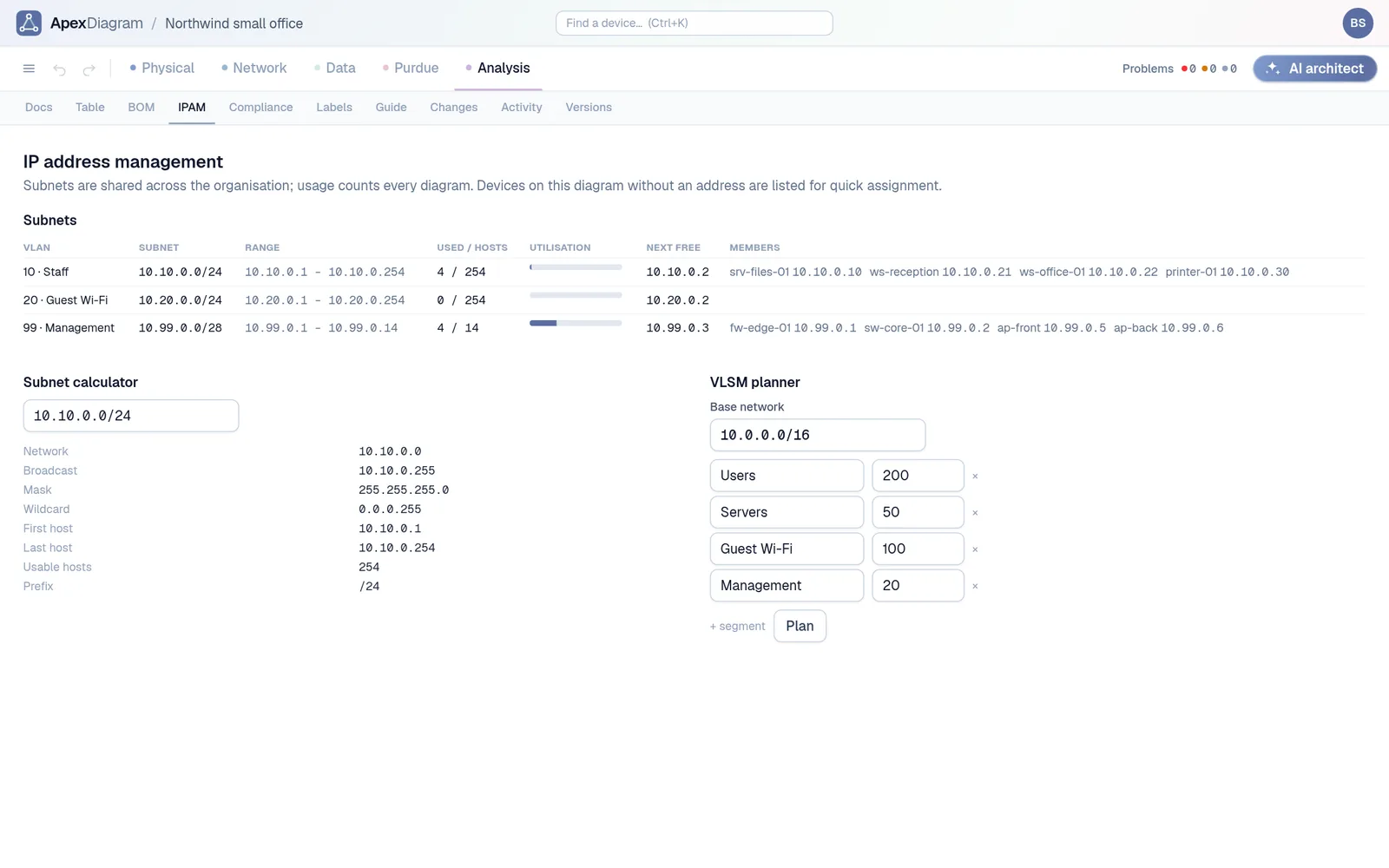
ApexDiagram's IPAM tab has a VLSM planner: give it a base block and a list of named host counts and it returns the aligned subnets, largest first, plus the leftover blocks. It can then create the VLANs and subnets in your diagram in one click, and the diagram assistant flags any device whose address falls outside its subnet. Use it to check your working, not to skip it: your lecturer will want the steps.
The IPAM tab: subnets, utilisation and the next free address
If you are doing this for coursework, Guided mode walks through the whole design, addressing included, and checks it as you go. See plans and pricing.
Document your network once, keep it current
One network graph, four synchronized views, a linter and a bill of materials. Import the Visio or draw.io file you already have.
Join the beta